

In the fast-paced world of technology and business, efficiency and ease of access are often prioritized. However, one common practice that can lead to severe security vulnerabilities is using an administrator account as your normal user account. This habit, while convenient, poses significant risks to your system’s security and the overall safety of your organization’s data.
Understanding User Accounts
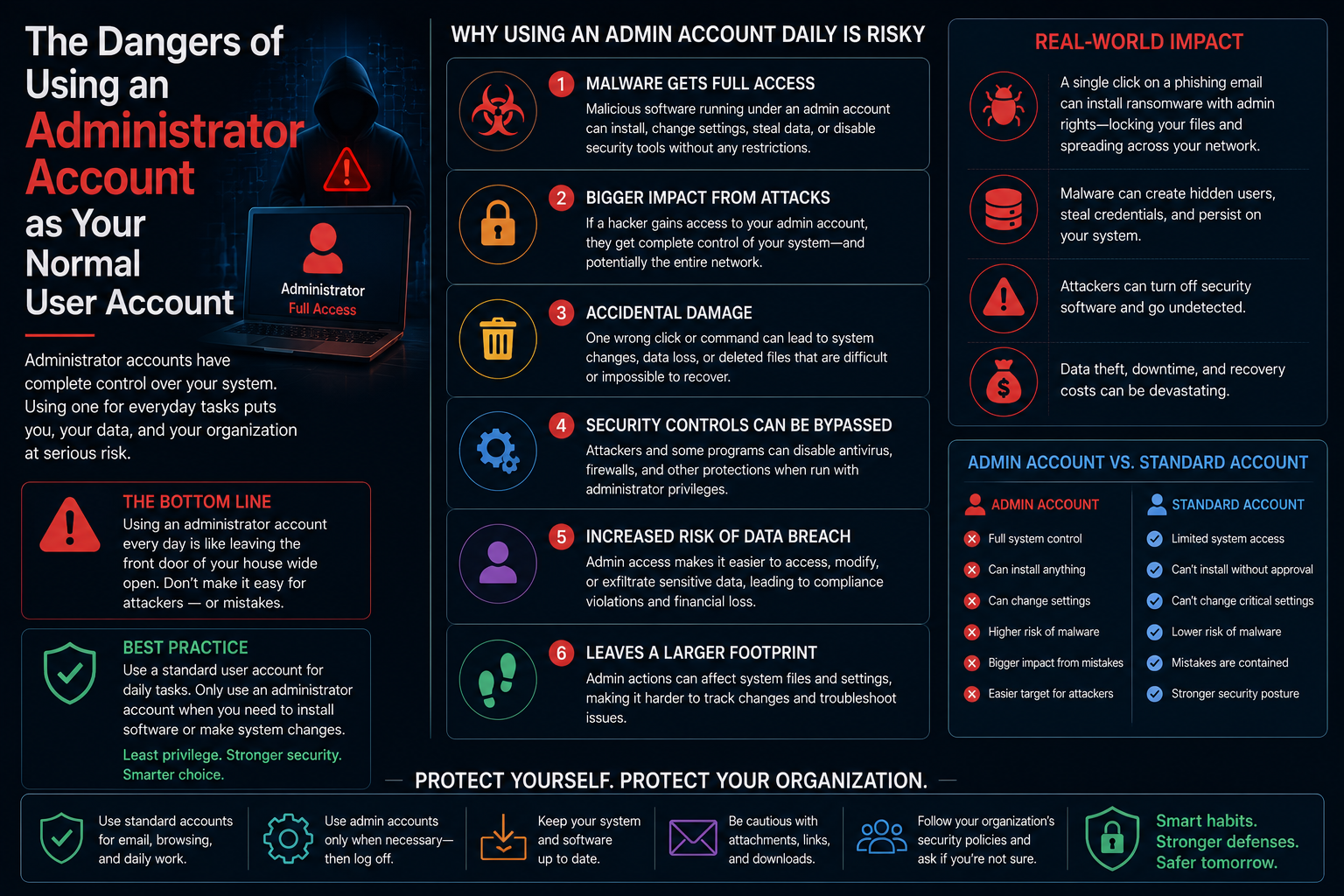
Before diving into the risks, it’s essential to understand the difference between standard user accounts and administrator accounts. A standard user account has limited permissions, allowing users to perform everyday tasks like browsing the internet, using applications, and creating files. An administrator account, on the other hand, has elevated privileges, enabling the user to install software, change system settings, and access all files on the system.
The Risks of Using an Administrator Account
- Increased Vulnerability to Malware and VirusesOne of the most significant risks of using an administrator account as your regular account is the increased vulnerability to malware and viruses. Malware often requires administrative privileges to install itself on a system. If you are using an administrator account, any malicious code that you inadvertently download can have unrestricted access to your system. This can lead to severe consequences, such as data breaches, loss of sensitive information, and system corruption.
- Accidental Changes to System SettingsAdministrator accounts have the power to alter critical system settings. Using such an account for everyday activities increases the likelihood of making accidental changes that could disrupt system functionality. For instance, you might unintentionally modify system files or settings that are crucial for the stability and security of your computer. These changes can lead to system crashes or create vulnerabilities that cybercriminals can exploit.
- Propagation of Errors and Security IssuesWhen using an administrator account, any error or security issue can propagate more quickly and broadly. For example, if a harmful script or command is executed, it can affect the entire system rather than just the user’s files. This can result in widespread damage and a more challenging recovery process.
- Compliance and Auditing ChallengesMany industries have strict compliance and auditing requirements to ensure data protection and privacy. Using an administrator account for regular activities can complicate auditing processes and compliance checks. It becomes difficult to track user activities and enforce accountability when the same account is used for both administrative and everyday tasks.
Best Practices for Account Management
To mitigate these risks, it is crucial to follow best practices for account management:
- Use a Standard User Account for Daily ActivitiesAlways use a standard user account for regular tasks such as browsing, emailing, and working on documents. This limits the potential damage that can be caused by malware or accidental changes.
- Reserve Administrator Accounts for Specific TasksOnly use administrator accounts when necessary, such as installing software or performing system maintenance. This minimizes the exposure of administrative privileges to potential threats.
- Implement the Principle of Least PrivilegeEnsure that users have the minimum level of access required to perform their job functions. This reduces the risk of accidental or intentional misuse of administrative privileges.
- Regularly Review and Audit Account PermissionsPeriodically review account permissions and ensure that only authorized personnel have administrative access. Conduct regular audits to identify and address any discrepancies or security issues.
Using an administrator account as your normal user account might seem convenient, but the potential risks far outweigh the benefits. By adhering to best practices and maintaining a clear distinction between standard and administrative accounts, you can enhance your system’s security, reduce vulnerabilities, and ensure a safer computing environment for your organization. Prioritizing security and proper account management is essential in safeguarding your valuable data and maintaining the integrity of your systems.